Question

Need help pulling Revenue (with Year & Type: Actual/Modeled) for a list of 1,500 companies via search Build a List

  • September 16, 2026
  • 1 reply
  • 8 views

Hi team,

I'm working on a bulk lookup for a list of 1,500 companies and need to pull the following data points for each:

  • Revenue
  • Year of Revenue (i.e., the reporting/fiscal year the figure corresponds to)
  • Revenue Type — whether the figure is Actual or Modelled

When using the Build a List feature, I'm currently only able to retrieve the Sales figure — I don't see an option to bring in the associated year or the actual/modelled indicator alongside it.

My questions:

  1. Q1: Is it possible to pull "Revenue" (as opposed to just "Sales") through Build a List, or via another D&B tool/API?
  2. Q2: If only the Sales figure is available through Build a List, is there a way to also pull the Year of Sales and whether that sales figure is Modelled or Actual, alongside it — either as additional selectable fields or through a different export/report option?

Any guidance on the right data elements or workflow to get all three fields (Revenue/Sales, Year, Type) in one pull for a large list would be really helpful.

Thanks in advance!

1 reply

wheelern
Forum|alt.badge.img+9
  • D&B Employee
  • September 16, 2026

 Currently we don't have a filter in the D&B Hoovers UI that allows to only bring back actual sales or modeled sale numbers. Here are the defined values:

  • Actual: The value comes from a statutory filing at a local market registry.  

  • Estimated: Where no actual exists, this is using outbound research. For example: call to company, website etc. 

  • Modelled: Where no actual exists, this is using D&B analytics to determine a figure based on other available data. 

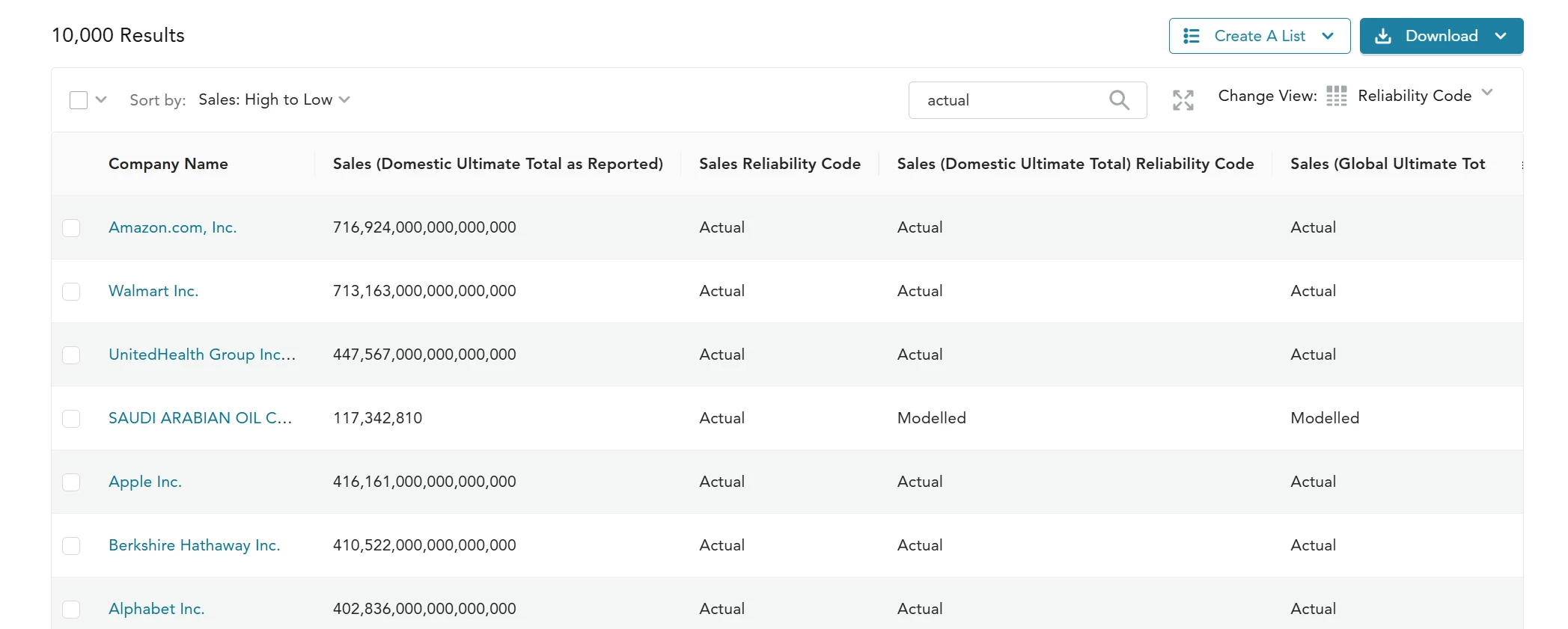
You can see that flag available in table view called Sales Reliability Code that can be leveraged to identify the companies with Actual Sales vs. Modeled Sales in a list or set of search results. On your list results page, create a Table View and choose the Sales Reliability Code as a data point.