Question

Building aprospect lists

  • June 25, 2026
  • 1 reply
  • 12 views

How do I build a list of companies and contacts based on NAICS codes

1 reply

Foulka
Forum|alt.badge.img+4
  • D&B Employee
  • June 26, 2026

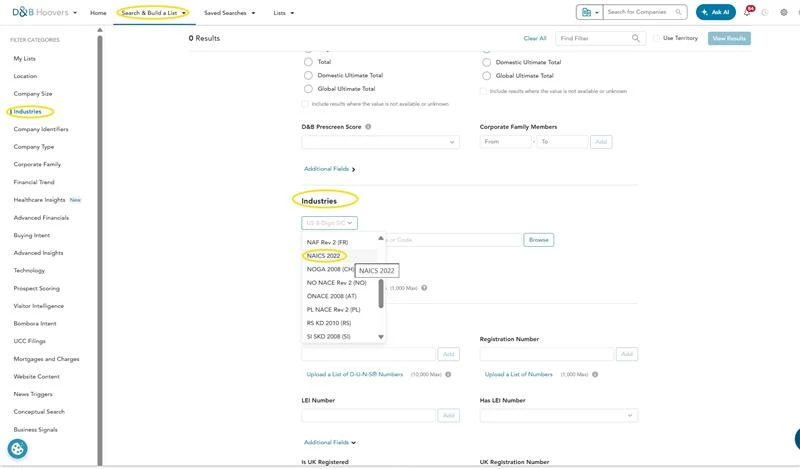
To build a prospect list using NAICS codes in D&B Hoovers, you can follow these steps:

  • From the top navigation, select Search & Build a List → Industries
  • In the filters panel, locate Industry
  • Choose NAICS from the drop down menu
  • Enter a specific NAICS code  or search by keyword
  • You can:
    • Add multiple NAICS codes
    • Use broader (2–3 digit) or more specific (5–6 digit) codes depending on how targeted you want your list


Build a Contact List from Those Companies

Once you have your company list:

  • Within your saved list, choose Search Contacts
  • Apply contact-level filters such as:
    • Job function (e.g., Marketing, Finance)
    • Job level (e.g., Manager, Director, C-suite)
  • Run the search to generate associated contacts