

Coming Soon: The D&B Hoovers Personalized Experience
Powerful Recommendations and Useful Shortcuts at Your Fingertips
When you need to pull business information about a company on your radar, the search tools within D&B Hoovers can lead you to everything you need. However, many users have found that they can miss individual signals or talking points because valuable intelligence must be accessed within the varied reports on a company profile.
To make your workflows more efficient, leverage our personalization features and push relevant insights about your hottest prospects to your D&B Hoovers dashboard!
Your D&B Hoovers Dashboard
Every login to D&B Hoovers will take you to a customizable dashboard with tools that can be personalized in less than ten minutes to build a customized workspace:
- Your D&B Hoovers SmartFeed: prioritized accounts highlighted with fresh insights
- Limited to companies in your configured territory
- Each account ranked based on current attributes, recent activities, and your selected business signals
- Insights, triggers, and recommended next steps for every prospect
- Daily personalized updates: what’s new in D&B Hoovers?
- Today’s updates to your dynamically generated SmartLists
- Recent News for focus companies with links to sources
- Graphs tracking anonymous visits to your website matched to companies (requires Visitor Intelligence add-on)
- Workflow assistants: Jump back into critical tasks
- Automatic log of recent searches
- Shortcuts to recently viewed companies and contacts
SmartFeed Recommendations
In your curated SmartFeed, multiple streams of activity data and company attributes are combined to prioritize accounts and generate recommendations for outreach:
- Attributes: Firmographics, Technographics, Prospect Scores generated from your first-party company data
- Signals: News articles, business triggers with positive developments or adverse occurrences, financial data
- Buyer Activities: Recent visits to your corporate website (for customers with Visitor Intelligence add-on), buyer intent data (for customers with Bombora add-on)
The SmartFeed presents your recommendations on a personalized list of hot prospects refreshed every day or when new information becomes available. You will see high-priority accounts ranked based of depth and recency of buyer activity with bullet points detailing what you may find interesting about that account. Look for links to the most relevant contacts and potential talking points for each prospect.
Personalize Your SmartFeed
To keep your recommendations relevant, click to the User Preferences page and look for the Personalization tab.
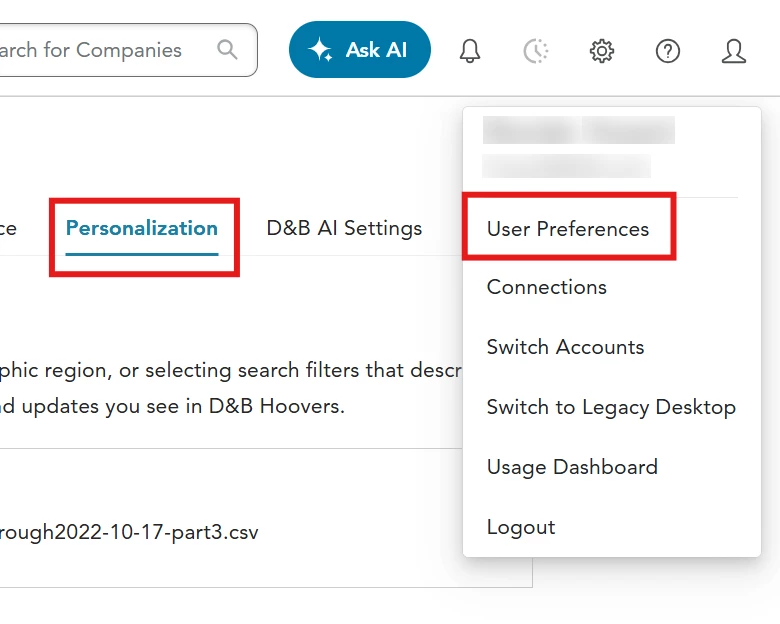
Set a Territory and a Buying Team aligned with your selling strategies, and use Configure Your Feed settings to quickly create a super-personalized launchpad:
- Recommendations for companies in your Territory
- Buying Team contacts ideal for outreach
- Prospects with attractive attributes ranked closer to the top
First, define your Territory to limit companies on the prioritized feed to your configured universe of accounts. Pick the most relevant option:
- Upload a list of your assigned accounts (CSV format, limit 5000), OR
- Select filters to define your sales territory by location, company size, industry, etc., OR
- Sync your owned accounts from a supported CRM and match to the D&B Hoovers database
Next, create a Buying Team template with keywords and phrases that appear in job titles of decision makers and influencers, or pinpoint contacts in a functional group attractive for outreach. Members of the Buying Team will be highlighted in the SmartFeed, with newly-refreshed contacts matching your preferences getting special treatment as a Buying Team Highlight. While you may create multiple Buying Team template and toggle between them for various tasks, you must select a default to influence your SmartFeed.
Pro Tip: For your default Buying Team, we recommend saving a string of keywords likely to appear in the job title of a contact who would be most responsive to your outreach. You can add or remove keywords as needed at a later date.
Finally, identify companies most likely to result in a closed opportunity with the Configure Your Feed settings. Submit your preferences to emphasize important company attributes within your Territory without filtering out potential prospects. For example, if you have success closing deals with companies in the Banking industry with 100+ employees, make those selections in the Company Size and Industries options and save them to your preferences. Prospects matching those selections receive a boost in the SmartFeed rankings and will be more likely to appear at the top of your personalized feed. (You will still see companies not matching those preferences in the SmartFeed.)
To receive the most timely and relevant updates in your SmartFeed, please give special attention to these Configure Your Feed settings:
- Investigate the Triggers section in the Configure Your Feed section to select up to 10 types of company news Triggers that you want to monitor in your SmartFeed. Your selections will be labeled as Key Triggers on the SmartFeed and will also receive a boost in the rankings.
- If you have purchased the Visitor Intelligence add-on and configured multiple Page Categories to organize the visits to your corporate website, you can select up to 10 Page Categories in the Configure Your Feed section to highlight on the SmartFeed and receive a further boost in the rankings. If you do not select any Page Categories, the SmartFeed will include updates for all web visits.
The options in the Configure Your Feed section will vary depending on which add-ons you have included in your D&B Hoovers subscription. Please check with your representative to discuss adding Technology Insights, Visitor Intelligence, D&B Buyer Intent, or Bombora to your package.
Stay Up to Date with Your Key Accounts
If you see a high-value company while browsing through D&B Hoovers, click the Follow button next to a company name and critical updates will appear on your dashboard even if that company is not part of your configured territory. A single click tells us when you want more updates, recommendations, and notifications for that company in your SmartFeed and throughout D&B Hoovers. (Limit 1000 companies.) You can Unfollow a company just as quickly.
Generating Your SmartFeed
D&B Hoovers does the hard work of aggregating business intelligence and evaluating against your preferences to generate your feed. Simply log in to set off a sophisticated process identifying updates across your configured territory plus any companies you have chosen to follow. The dynamic SmartFeed will present companies with the most relevant
and recent updates at the top:
- News articles or business triggers matching your selections
- Contacts in the configured Buying Team
- Companies or contacts just added to your dynamically generated SmartLists
- Web visits or intent data for customers who have purchased D&B Hoovers add-ons
Please note that your SmartFeed will contain recently viewed companies and Followed companies if you have not configured your territory in the User Preferences > Personalization tab. We strongly suggest that you define your Territory as described above to populate the SmartFeed with relevant companies.
After your first visit on a particular day, the contents of your SmartFeed will refresh once an hour to retrieve news articles and other signals that become available in real time. (Most information feeds are updated on a daily or weekly schedule.)
If you change your configurations (Territory, Buying Team default, etc.) on the User Preferences > Personalization tab and would like to apply those new configurations to the SmartFeed, visit the dashboard and click the manual refresh button near the Your Smartfeed label. Note: this manual refresh button will only appear after you make a
configuration change on the Personalization tab.
Workflow Assistants and Activity Shortcuts
While the SmartFeed is the centerpiece of your dashboard, you may find the dedicated widgets alongside the feed to be just as valuable:
- SmartList Updates: See today’s notifications for the companies, contacts, and more that were added to your dynamically generated SmartLists
- Recent News: Investigate the latest press clippings for your Followed companies and stay in the loop
- Recent Searches: D&B Hoovers automatically logs 50 searches and filter modifications; pick up where you left off or backtrack to a search that you neglected to save
- Recently Viewed: When you view a company, contact, or industry, this widget provides you with breadcrumbs to return to any of the past 50 objects in your browsing history
- Visitor Intelligence: A handy report charting Web Visit data for companies who visited your corporate website most often in recent days. When you have configured Page Categories on the Personalization tab, the report will be limited to your configurations. Click View All to see all Web Visit notifications.
- Pinned Items: For longtime users who have “pinned” companies, contacts, and searches to their legacy desktop, this widget provides access to those shortcuts. (Please note that these pins will be taken out of service at a later date and migrated to Followed companies and contacts.)